Writing
Shipping WhatsApp's Native Catalog + Cart: A Field Guide to the Undocumented Gotchas
August 12, 2026 · Amit Solanki
I built a Rails demo — a fictional restaurant called “The Local Table” — to show off WhatsApp’s native Catalog and Cart experience: a customer messages your business number, taps a catalog icon, browses a real menu inside the chat, adds items to WhatsApp’s built-in cart, and sends the order. The Rails side — feed generation, webhook handling, order processing — took about two hours. Getting a real WhatsApp number into a state where it could actually use Catalog and Cart took most of a day, across two Meta accounts, three WhatsApp Business Accounts, and enough undocumented failure modes that I’m writing them all down so the next person doesn’t lose the day I lost.
If you’re building anything on the WhatsApp Business Platform beyond basic send/receive, this is for you.
Code’s here: github.com/amitkssolanki/whatsapp-integration.
The setup that looked simple on paper
The plan was straightforward: Rails app serves a product feed, Meta’s Commerce Manager syncs it into a Catalog, the Catalog gets linked to a WhatsApp Business Account (WABA), and a webhook endpoint receives orders when customers check out. I built the entire Rails side first — a Catalog::FeedGenerator producing Meta’s expected CSV format, a webhook controller with signature verification, order-processing logic that matches WhatsApp’s cart payload to real products by SKU — and tested every piece of it against fixtures and simulated payloads before touching Meta’s dashboard at all. All green.
Then I went to actually connect a phone number, and spent the rest of the day discovering that “connect a phone number to WhatsApp” is not one step. It’s closer to eight, and at least four of them fail silently.
Wall #1: the account itself
Before I could create anything, the Meta developer account got flagged — first an “unusual activity” lock requiring manual confirmation, then, after clearing that, a “your business is prohibited from advertising, including claiming apps” restriction when trying to create the first app. Both were real, both required manual review on Meta’s side, and — this part matters — both appeared to be triggered or worsened by browser automation driving the Meta dashboards. After the first block, I stopped using any automated browser tooling on developers.facebook.com or business.facebook.com entirely and did every subsequent dashboard step by hand. If you’re scripting any part of Meta account setup, expect scrutiny.
Wall #2: WhatsApp isn’t where you think it is
Meta ships a newer “use case” based app-creation flow. If you pick “Connect with customers through WhatsApp” as a use case when creating the app, rather than adding WhatsApp as a classic “Product” afterward, the WhatsApp configuration doesn’t show up under Add Product, and it doesn’t show up in the app’s left sidebar either — both of which are where every piece of documentation and every tutorial says to look.
It’s actually under the app’s Dashboard → the WhatsApp use-case card at the top of the page — easy to scroll past, since “Required actions” sits right below it and looks like the top of the page — or directly at:
https://developers.facebook.com/apps/<APP_ID>/whatsapp-business/wa-dev-console/Even that direct link silently no-ops, redirecting back to the plain dashboard, if the underlying WhatsApp Business Account state is in a bad place — which is exactly what Wall #3 turned out to be.
Wall #3: the SMB/Cloud API split nobody warns you about
WhatsApp has two completely different product lines that both produce a number that “is on WhatsApp”:
- WhatsApp Business App — the free consumer app people install on their phone. Numbers here are
platform_type: ON_PREMISEin the Graph API. - WhatsApp Cloud API — what you actually want for a bot or integration. Numbers here are
platform_type: CLOUD_API.
A number can only be one or the other at a time. If your business’s WABA already has a phone number registered through the consumer app — extremely likely if you’re testing with a real business’s real number — trying to register it for Cloud API fails with:
{"error":{"message":"Register endpoint is not available for SMB businesses."}}The /register call itself looks completely fine — same shape, same auth — and the error message doesn’t say “wrong number type,” it just declines. I burned real time assuming this was a permissions problem before finding a Meta partner’s community post confirming it’s a hard product-line split, with exactly two supported fixes: Coexistence — an Embedded Signup flow that lets both run side-by-side, but requires the number to have 7+ days, ideally 1–2 months, of WhatsApp Business App history first, plus a separate signup implementation — or delete the number from the WhatsApp Business App entirely and onboard it fresh to Cloud API.
For a number you don’t need in the consumer app, deletion is the fast path: open WhatsApp Business App → Settings → Account → Delete my account. Worth flagging loudly, though: it takes the entire WABA with it, not just the number — I watched the WABA ID that had been failing all session simply stop existing in the Graph API afterward (Unsupported get request on an ID that resolved fine minutes earlier). Don’t do this to a number or WABA with anything you care about still attached.
Wall #4: the free test number doesn’t do Catalog or Cart
Once the real number was freed up, the path of least resistance was Meta’s auto-provisioned free test number — via the use-case wizard’s “Step 1: Try it out” — no phone verification, no PIN, ready in seconds, and it correctly sends and receives via the Graph API. Naturally I built on it.
It cannot do Catalog or Cart. There’s no error message for this — the “Catalogue” item in WhatsApp Manager’s sidebar for that WABA is simply greyed out, permanently, with no tooltip explaining why. I initially assumed it was a permissions issue on my token; it wasn’t. Sandbox test WABAs structurally don’t support commerce features, and there’s no workaround short of using a different, non-test WABA.
The fix: create a second WABA under the same business (Business Settings → Accounts → WhatsApp accounts → Add), attach the real, freed-up number to that one via WhatsApp Manager → Phone numbers, and confirm via the API:
curl "https://graph.facebook.com/v21.0/<PHONE_NUMBER_ID>?fields=platform_type,code_verification_status,status" \
  -H "Authorization: Bearer <TOKEN>"

# {"platform_type":"CLOUD_API","code_verification_status":"VERIFIED","status":"CONNECTED"}
On this non-test WABA, “Catalogue” was immediately clickable — no Business Verification required for this specific step, contrary to what I’d assumed going in.
Wall #5: catalog_management isn’t a real permission (yet)
Linking the Commerce Manager catalog to the WABA via the Graph API (POST /<WABA_ID>/product_catalogs) kept failing:
{"error_user_title":"INVALID_PRODUCT_CATALOGUE_ID",
 "error_user_msg":"Cannot link WhatsApp Business account with an invalid product catalogue ID."}
The catalog ID was correct — I could see it plainly in Commerce Manager. The actual problem: my token didn’t have catalog_management, and that permission wasn’t offered anywhere I looked — not in the app’s own token generator (Use Cases → Customize → Permissions and features, which only ever showed four: manage_app_solution, whatsapp_business_manage_events, whatsapp_business_management, whatsapp_business_messaging), and not via a fresh token generated through Business Settings → System users either.
The root cause: the app itself was missing a use case. WhatsApp messaging and catalog management are separate use cases in Meta’s system — picking “Connect with customers through WhatsApp” at app creation does not imply “Manage products with Catalog API.” Fix it from the app’s own dashboard: Use cases → Add use cases → check “Manage products with Catalog API” → Save. Once that’s added, catalog_management becomes a real, grantable scope everywhere, both from the app’s own token generator and from a System User token, with no other workaround needed.
Wall #6: subscribed_apps is per-WABA, silently
This one cost the most time relative to how small the fix was. Webhooks were correctly configured — callback URL verified, messages field subscribed — and outbound sends worked, but real inbound customer messages and orders never reached the app. No error anywhere. The webhook verification handshake succeeded. The messages field showed “Subscribed.” Everything looked wired.
The actual state, checked directly via the Graph API:
curl "https://graph.facebook.com/v21.0/<WABA_ID>/subscribed_apps" -H "Authorization: Bearer <TOKEN>"
# {"data":[]}
Empty. An app being subscribed to receive webhooks for one WABA doesn’t carry over when you switch to a different WABA — including a brand-new production WABA that replaces a test one you’d already wired up. It’s a one-line fix once you know to look:
curl -X POST "https://graph.facebook.com/v21.0/<WABA_ID>/subscribed_apps" -H "Authorization: Bearer <TOKEN>"
# {"success":true}
If outbound messages work but inbound webhooks never arrive after you’ve touched more than one WABA, check this first. It will not show up as an error in your webhook config UI.
Wall #7: the 24-hour session window, but for catalog messages too
WhatsApp only lets a business send free-form messages to a customer within 24 hours of that customer’s last message — template messages are the only exception. That part’s documented. Less obvious: interactive messages, including the native catalog_message type, are subject to the exact same rule. The send API doesn’t tell you this at the point of failure, either — it returns a completely normal-looking 200 OK with a real message ID:
{"messaging_product":"whatsapp","contacts":[{"input":"...","wa_id":"..."}],
 "messages":[{"id":"wamid.HBg..."}]}
…and the message never displays. A blocked-by-session-window send and a genuinely successful send are byte-for-byte identical in the synchronous API response. The only way to know the difference is a message-status webhook — itself gated behind app publishing/verification in some configurations — or just asking the human on the other end whether it showed up. More than once this session, I “successfully” sent a message that simply never arrived, and had to work backward to figure out why.
The fix is always the same: have the customer message the business first. That single inbound message opens the window for everything else — text, interactive, catalog — for the next 24 hours.
Wall #8: a real bug in my own code
Not a Meta gotcha — while debugging the above, I found a genuine bug in the WhatsappClient#send_catalog_message method I’d written: I’d made thumbnail_product_retailer_id optional. The Graph API requires it — a catalog_message sent without one fails with action['parameters'] cannot be empty (#131009). Worth mentioning because it’s a good example of how easy it is to design an API wrapper around what the docs’ prose implies (“optional-sounding”) rather than what the API actually enforces. Fixed by making it a required keyword argument and having the caller pass a real SKU from the menu.
The finish
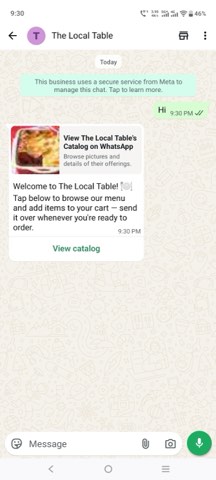
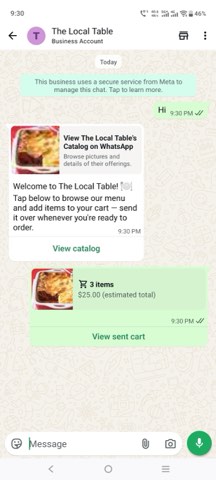
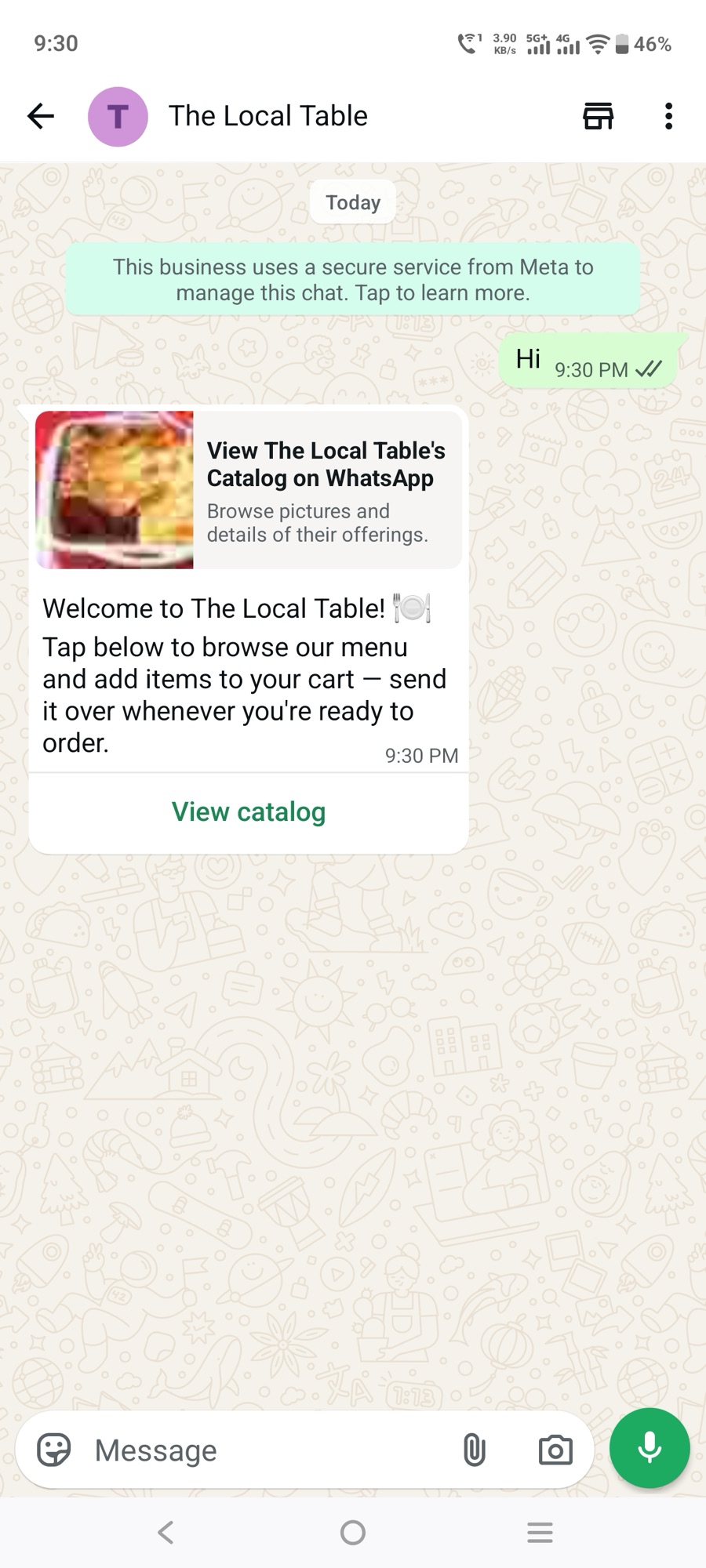
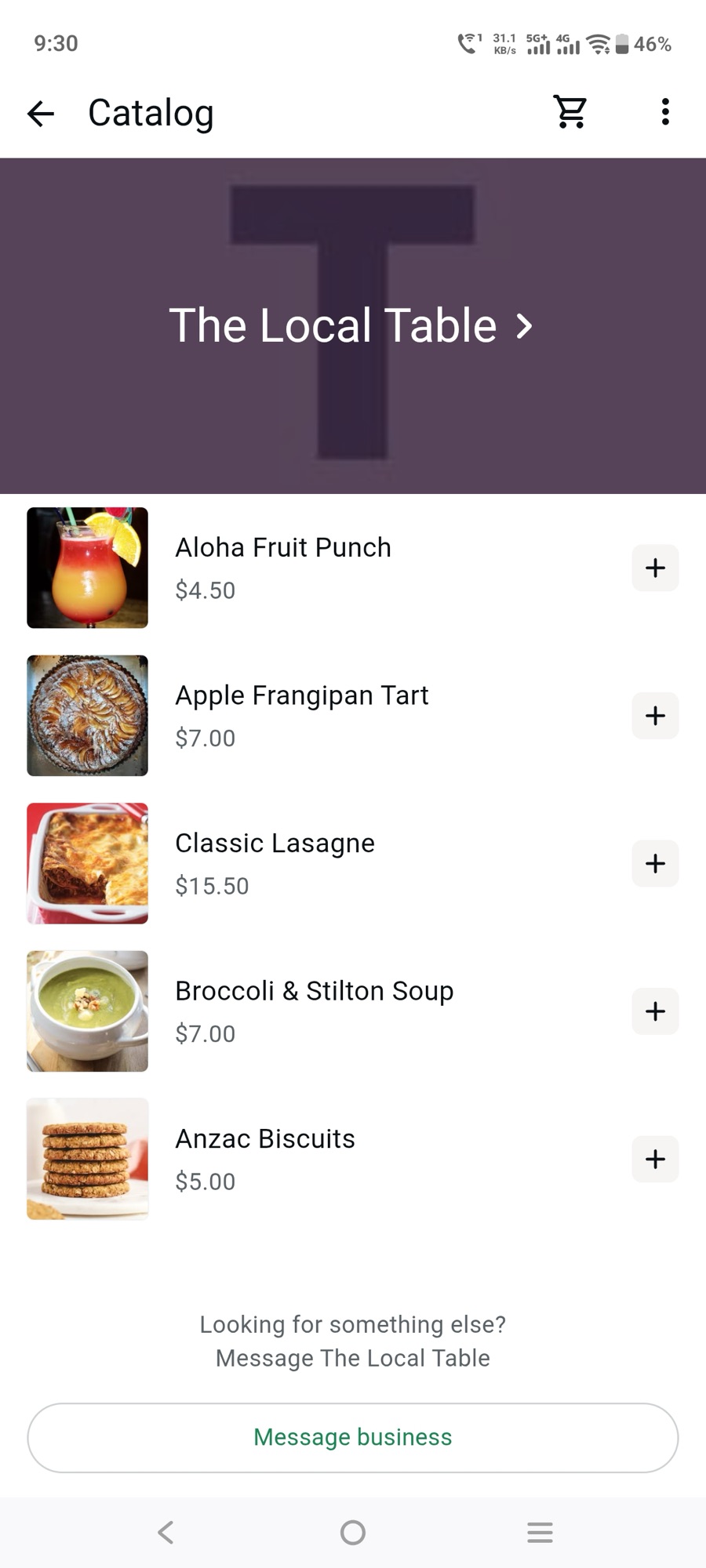
Once all eight were cleared — real number on a non-test, catalog-linked WABA; app subscribed to that WABA’s webhooks; a customer-initiated message open on the session window — the whole loop worked exactly as designed, on the first real attempt:
21:30:17  customer → "Hi"
21:30:20  bot → native catalog card (auto-reply)
          [customer browses WhatsApp's built-in catalog UI, adds 3 items, taps Send]
21:30:52  order webhook arrives
21:30:53  bot → order confirmation, itemized, correct total
What that actually looked like, screen by screen:
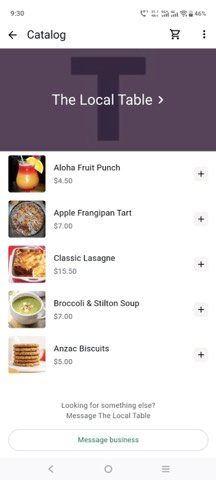
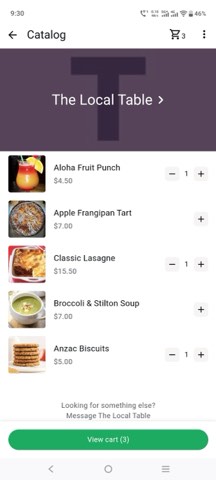
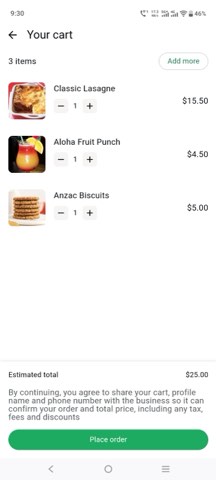
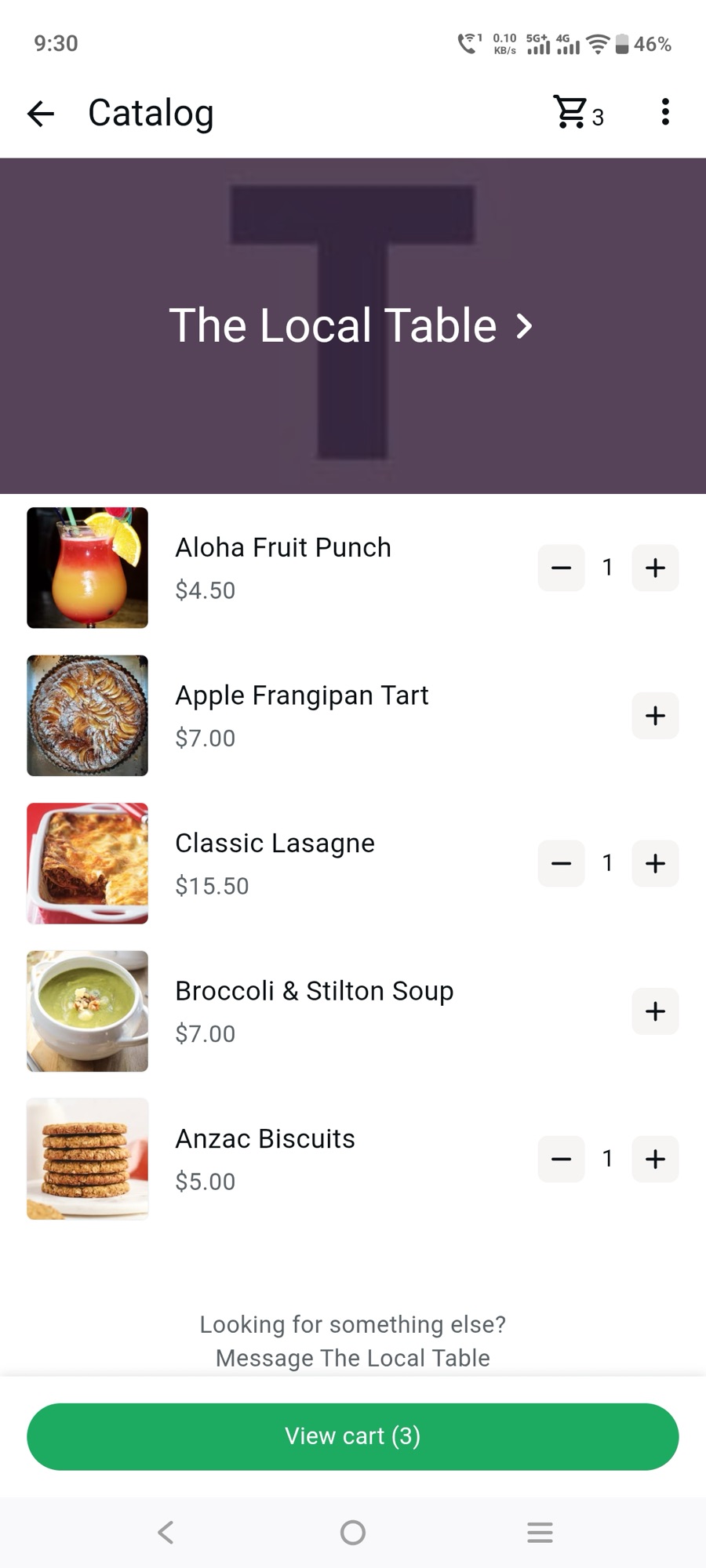
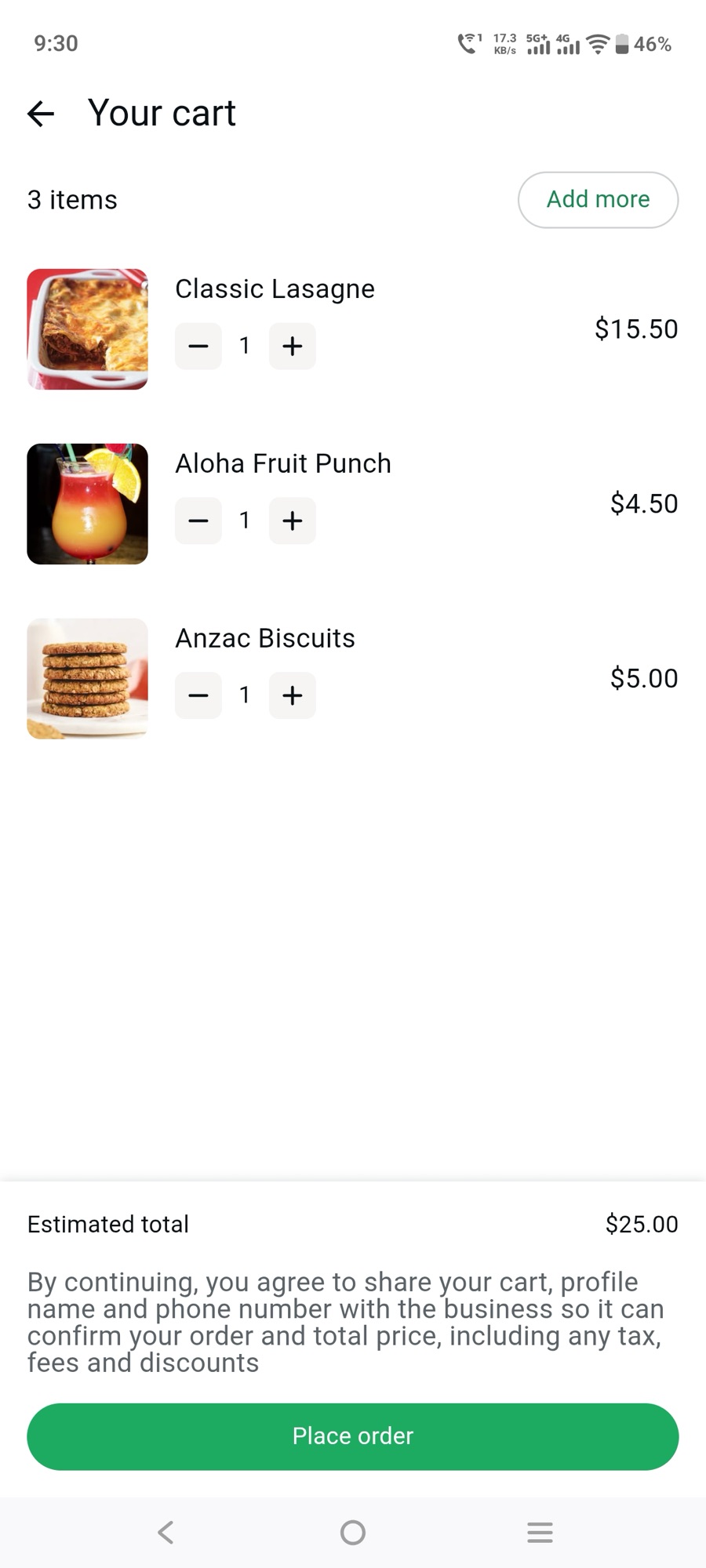
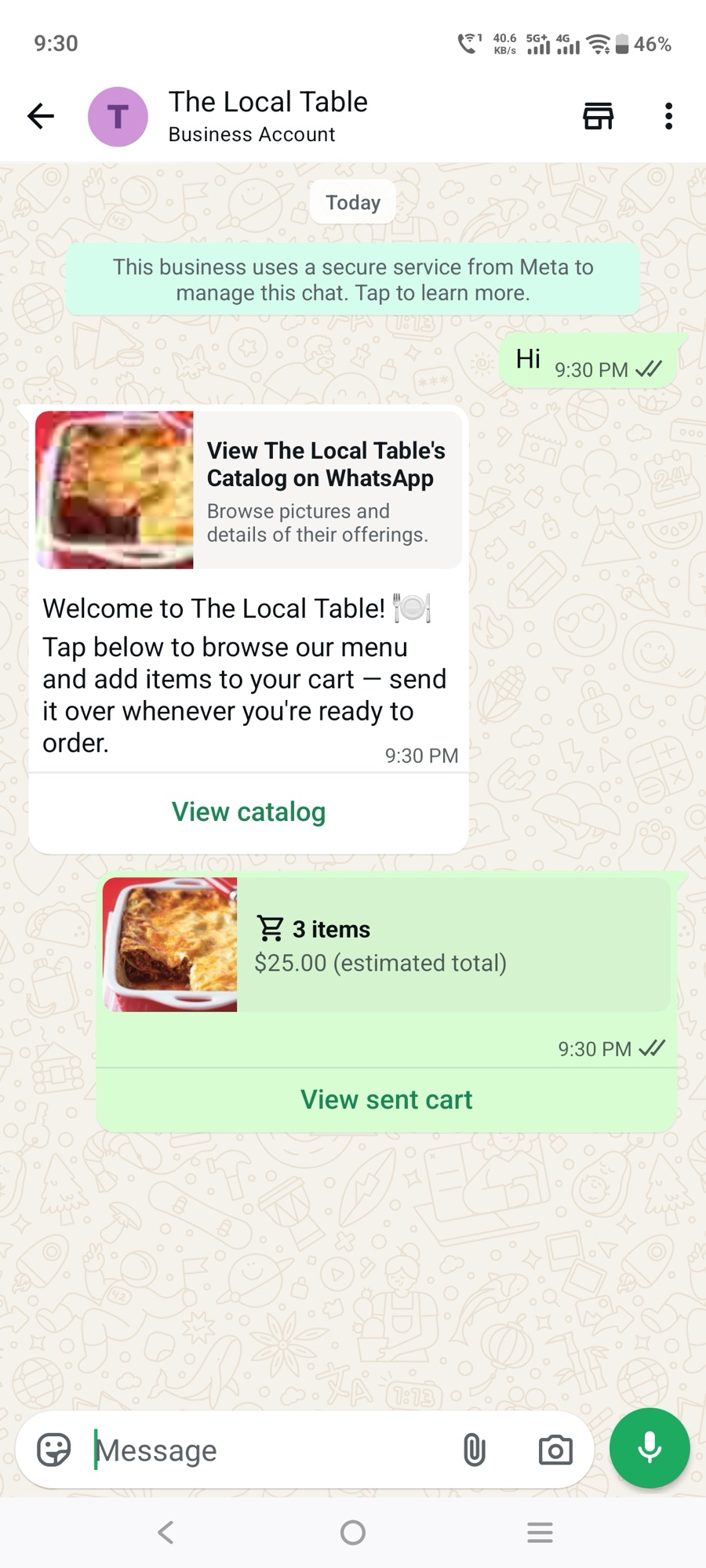
The order landed in the Rails app’s admin view exactly as built: three line items resolved to real Product records by SKU, correct unit prices, correct total. Nothing about the Rails code needed to change once the Meta side was actually correct — which, in hindsight, was the whole point of building and testing it thoroughly before touching any of this.
Architecture, in short
Catalog::FeedGenerator— builds a CSV in Meta’s commerce feed format (id,title,description,availability,condition,price,link,image_link,brand) from the app’s ownProductrecords.iddoubles as the WhatsAppretailer_idused everywhere downstream.GET /catalog/feed.csv— public, unauthenticated (Meta’s crawler needs to reach it), polled on the schedule set in Commerce Manager.Webhooks::WhatsappController—GEThandles Meta’s verification handshake;POSTverifiesX-Hub-Signature-256and hands off to a processor.Webhooks::WhatsappMessageProcessor— dispatches inbound payloads bytype.ordercreates anOrderandOrderItems from the cart’sproduct_items, matching eachproduct_retailer_idback to a realProductby SKU.textruns a small canned responder that replies with the native catalog card on a greeting.WhatsappClient— a thin wrapper around the Graph API’s/messagesendpoint for text sends andcatalog_messageinteractive sends.
The design choice worth calling out: no LLM, no agent loop. WhatsApp’s native Catalog UI does all the product browsing — the app’s job is just feed generation and order processing. That’s a meaningfully smaller surface area than a conversational commerce bot, and it’s why the Rails side was fast to build and never needed to change once Meta’s setup was correct.
The gotcha reference table
| Symptom | Real cause | Fix |
|---|---|---|
Register endpoint is not available for SMB businesses | Number is ON_PREMISE (WhatsApp Business App), not CLOUD_API | Delete from WhatsApp Business App (takes the WABA with it), then register fresh for Cloud API |
| ”Catalogue” greyed out in WhatsApp Manager | That WABA is the free auto-provisioned test sandbox — doesn’t support commerce | Create a second, non-test WABA under the same business; attach the real number there |
INVALID_PRODUCT_CATALOGUE_ID linking a real catalog | The app is missing the “Manage products with Catalog API” use case, so catalog_management isn’t a grantable scope yet | App dashboard → Use cases → Add use cases → check “Manage products with Catalog API” → Save |
| Outbound sends work, inbound webhooks never arrive | subscribed_apps wasn’t set for this WABA — it’s per-WABA, not per-app | POST /<WABA_ID>/subscribed_apps; verify with GET — should list your app |
catalog_message returns 200 OK with a message ID but nothing displays | No open 24h customer-service session window (interactive messages follow the same rule as free text) | Have the customer message the business first; templates are the only exception |
action['parameters'] cannot be empty (#131009) sending a catalog message | thumbnail_product_retailer_id is required, not optional | Always pass a real product SKU as the thumbnail |
hello_world template fails on a real number | That template is test-number-only | Create and get approval for your own custom template |
| WhatsApp desktop/mobile shows “Invite” instead of a chat when messaging a freshly-registered number | Contact-discovery propagation lag on WhatsApp’s side | Wait, or try typing the full number directly instead of searching |
A pre-flight checklist, if you’re about to do this yourself
- Confirm which product line your number is on before you start:
GET /<PHONE_NUMBER_ID>?fields=platform_type. If it’sON_PREMISEand you need Cloud API, plan for either Coexistence (7+ days of app history required) or a clean re-registration. - Don’t build on the free test number if Catalog/Cart is part of the plan. Create your production WABA from the start.
- If you’ll need
catalog_management, add the “Manage products with Catalog API” use case to your app up front (Use cases → Add use cases) — picking the WhatsApp messaging use case alone doesn’t include it, and without it no token, from any source, will carry that scope. - After creating or switching WABAs, explicitly check and set
subscribed_apps. Don’t trust the webhook config UI’s “Subscribed” label — verify with aGET. - Test delivery with a template message first if you want a synchronous, trustworthy success/fail signal. Free text and interactive messages will lie to you with a clean
200even when they silently fail. - Keep your own app logic entirely decoupled from Meta’s account state while you’re getting it right — build and test against fixtures first. Every wall above was a Meta-account or product problem, not a code problem, and none of it required touching the application logic once diagnosed.
If you’re mid-fight with any of these right now: check platform_type and subscribed_apps first — between them they explained most of a day’s worth of confusion, and neither surfaces as an error anywhere in Meta’s UI.
Working through something similar?